

Parse and Analyze Excel Spreadsheets
Parse an Excel spreadsheet to markdown with LlamaParse and build a mini RAG app over the table data using LlamaIndex and OpenAI.
In this example, learn how to use Parse on Excel spreadsheets, and (optionally) use that as the basis for a RAG app that can answer questions about the data within the table.
For this example, we’ll be using a simple DCF template, which you can download here. Once you do, rename the file to dcf_template.xlsx.
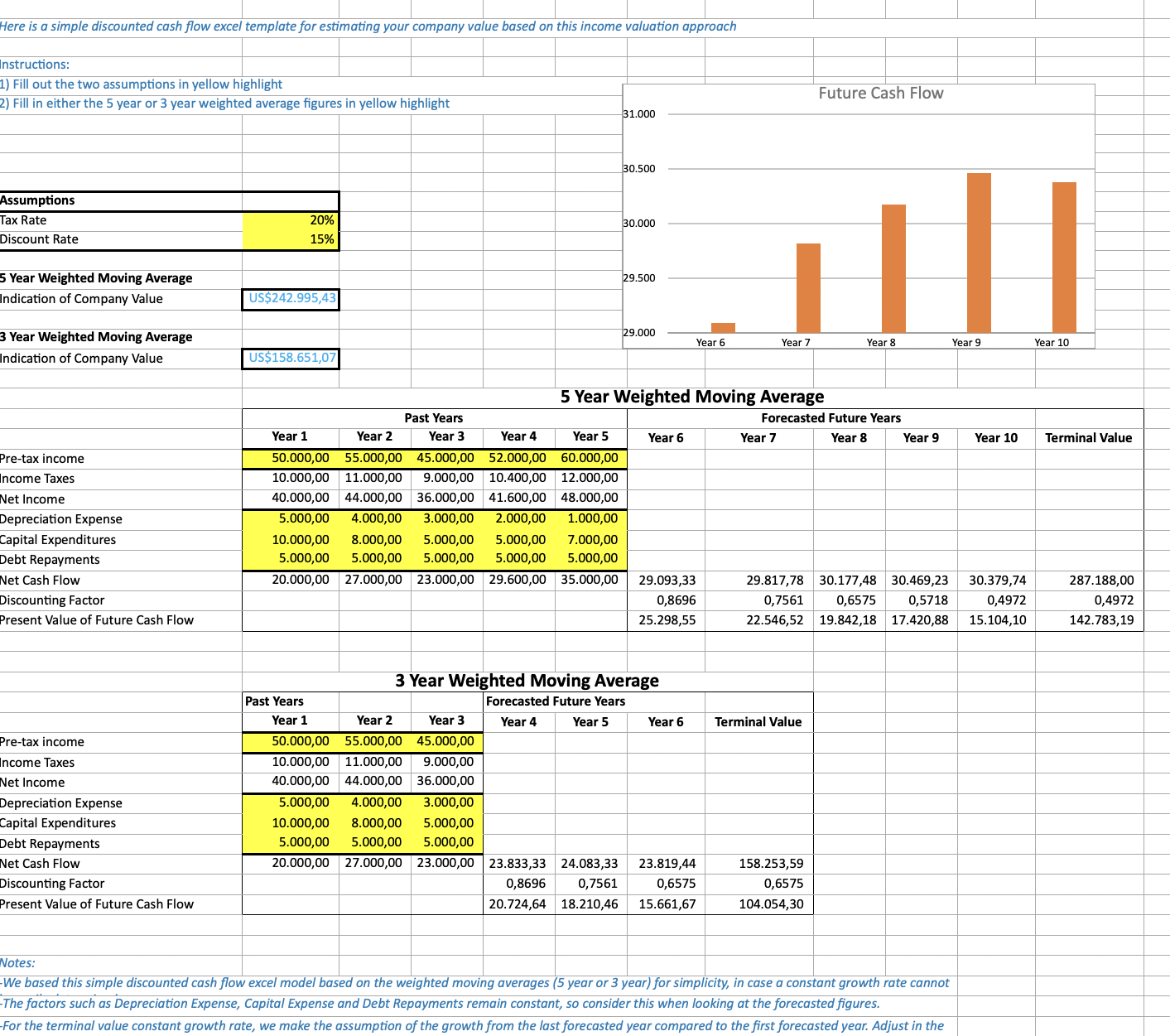
At the end of this example, we will create a mini RAG app with LlamaIndex framework that can answer questions, using OpenAI. You can skip this part, or use another model provider. That final step uses Python.
Setup & Connect to LlamaCloud
Section titled “Setup & Connect to LlamaCloud”You’ll need a LlamaCloud API key. Set it as an environment variable so the SDKs pick it up automatically:
export LLAMA_CLOUD_API_KEY="llx-..."Install the SDK and construct a client:
pip install "llama-cloud>=2.8"from llama_cloud import LlamaCloud
client = LlamaCloud() # reads LLAMA_CLOUD_API_KEY from the environmentnpm install @llamaindex/llama-cloudimport LlamaCloud from '@llamaindex/llama-cloud';
const client = new LlamaCloud(); // reads LLAMA_CLOUD_API_KEY from the environmentgo get github.com/run-llama/llama-parse-gopackage main
import ( "context"
llamacloud "github.com/run-llama/llama-parse-go")
func main() { ctx := context.Background() client := llamacloud.NewClient() // reads LLAMA_CLOUD_API_KEY from the environment _ = ctx _ = client}implementation("ai.llamaindex:llama-cloud:1.3.0")import ai.llamaindex.llamacloud.client.LlamaCloudClient;import ai.llamaindex.llamacloud.client.okhttp.LlamaCloudOkHttpClient;
// reads LLAMA_CLOUD_API_KEY from the environmentLlamaCloudClient client = LlamaCloudOkHttpClient.fromEnv();go install github.com/run-llama/llama-parse-cli/cmd/llp@latestllp reads LLAMA_CLOUD_API_KEY from the environment (or pass --api-key).
Parse the Spreadsheet
Section titled “Parse the Spreadsheet”Upload the spreadsheet, parse it with the agentic tier (a strong default for
table-heavy documents), and request the per-page markdown. The DCF template’s
main table lives on the second sheet, so we read page index 1.
file = client.files.create(file="dcf_template.xlsx", purpose="parse")
result = client.parsing.parse(    file_id=file.id,    tier="agentic",    version="latest",    expand=["markdown"],)
# Print the markdown for the second sheet/pageprint(result.markdown.pages[1].markdown)
The SDK handles job polling for you—client.parsing.parse() blocks until the
job finishes and returns the full result.
import fs from 'fs';
const file = await client.files.create({  file: fs.createReadStream('dcf_template.xlsx'),  purpose: 'parse',});
const result = await client.parsing.parse({  file_id: file.id,  tier: 'agentic',  version: 'latest',  expand: ['markdown'],});
// Print the markdown for the second sheet/pageconsole.log(result.markdown.pages[1].markdown);
The SDK handles job polling for you—client.parsing.parse() awaits until the
job finishes and returns the full result.
f, err := os.Open("dcf_template.xlsx")if err != nil {  log.Fatal(err)}defer f.Close()
file, err := client.Files.New(ctx, llamacloud.FileNewParams{  File:    f,  Purpose: "parse",})if err != nil {  log.Fatal(err)}
job, err := client.Parsing.New(ctx, llamacloud.ParsingNewParams{  FileID:  llamacloud.String(file.ID),  Tier:    llamacloud.ParsingNewParamsTierAgentic,  Version: llamacloud.ParsingNewParamsVersionLatest,})if err != nil {  log.Fatal(err)}
// expand is a GET parameter in Go, so poll for the result, then request markdowngetParams := llamacloud.ParsingGetParams{Expand: []string{"markdown"}}result, err := client.Parsing.Get(ctx, job.ID, getParams)if err != nil {  log.Fatal(err)}for result.Job.Status != "COMPLETED" && result.Job.Status != "FAILED" && result.Job.Status != "CANCELLED" {  time.Sleep(2 * time.Second)  result, err = client.Parsing.Get(ctx, job.ID, getParams)  if err != nil {    log.Fatal(err)  }}if result.Job.Status != "COMPLETED" {  log.Fatalf("parse ended as %s", result.Job.Status)}
// Print the markdown for the second sheet/pagefmt.Println(result.Markdown.Pages[1].Markdown)
FileCreateResponse file = client.files().create(FileCreateParams.builder() .file(Paths.get("dcf_template.xlsx")) .purpose("parse") .build());
ParsingCreateResponse job = client.parsing().create(ParsingCreateParams.builder() .fileId(file.id()) .tier(ParsingCreateParams.Tier.AGENTIC) .version(ParsingCreateParams.Version.LATEST) .build());
// expand is a query parameter in Java, so poll for the result, then request markdownParsingGetParams getParams = ParsingGetParams.builder() .jobId(job.id()) .addExpand("markdown") .build();
ParsingGetResponse result = client.parsing().get(getParams);while (!result.job().status().equals(ParsingGetResponse.Job.Status.COMPLETED) && !result.job().status().equals(ParsingGetResponse.Job.Status.FAILED) && !result.job().status().equals(ParsingGetResponse.Job.Status.CANCELLED)) { Thread.sleep(2000); result = client.parsing().get(getParams);}if (!result.job().status().equals(ParsingGetResponse.Job.Status.COMPLETED)) { throw new RuntimeException("parse ended as " + result.job().status());}
// Print the markdown for the second sheet/pageSystem.out.println(result.markdown().get().pages().get(1).asMarkdownResult().markdown());# Upload the spreadsheetFILE_ID=$(llp files create \ --file dcf_template.xlsx \ --purpose parse | jq -r '.id')
# Start a parse jobJOB_ID=$(llp parsing create \ --file-id "$FILE_ID" \ --tier agentic \ --version latest | jq -r '.id')
# Poll until the job reaches a terminal statuswhile true; do STATUS=$(llp parsing get --job-id "$JOB_ID" | jq -r '.job.status') case "$STATUS" in COMPLETED|FAILED|CANCELLED) break ;; esac sleep 2done
# Print the markdown for the second sheet/page (index 1)llp parsing get --job-id "$JOB_ID" --expand markdown \ | jq -r '.markdown.pages[1].markdown'Expected output:
| Discounted Cash Flow Excel Template | |||||||||||
|---|---|---|---|---|---|---|---|---|---|---|---|
| Here is a simple discounted cash flow excel template for estimating your company value based on this income valuation approach | |||||||||||
| Instructions: | |||||||||||
| 1) Fill out the two assumptions in yellow highlight | |||||||||||
| 2) Fill in either the 5 year or 3 year weighted average figures in yellow highlight | |||||||||||
| Assumptions | |||||||||||
| Tax Rate | 20% | ||||||||||
| Discount Rate | 15% | ||||||||||
| 5 Year Weighted Moving Average | |||||||||||
| Indication of Company Value | $242,995.43 | ||||||||||
| 3 Year Weighted Moving Average | |||||||||||
| Indication of Company Value | $158,651.07 | ||||||||||
| 5 Year Weighted Moving Average | |||||||||||
| Past Years | Forecasted Future Years | ||||||||||
| Year 1 | Year 2 | Year 3 | Year 4 | Year 5 | Year 6 | Year 7 | Year 8 | Year 9 | Year 10 | Terminal Value | |
| Pre-tax income | 50,000.00 | 55,000.00 | 45,000.00 | 52,000.00 | 60,000.00 | ||||||
| Income Taxes | 10,000.00 | 11,000.00 | 9,000.00 | 10,400.00 | 12,000.00 | ||||||
| Net Income | 40,000.00 | 44,000.00 | 36,000.00 | 41,600.00 | 48,000.00 | ||||||
| Depreciation Expense | 5,000.00 | 4,000.00 | 3,000.00 | 2,000.00 | 1,000.00 | ||||||
| Capital Expenditures | 10,000.00 | 8,000.00 | 5,000.00 | 5,000.00 | 7,000.00 | ||||||
| Debt Repayments | 5,000.00 | 5,000.00 | 5,000.00 | 5,000.00 | 5,000.00 | ||||||
| Net Cash Flow | 20,000.00 | 27,000.00 | 23,000.00 | 29,600.00 | 35,000.00 | 29,093.33 | 29,817.78 | 30,177.48 | 30,469.23 | 30,379.74 | 287,188.00 |
| Discounting Factor | 0.8696 | 0.7561 | 0.6575 | 0.5718 | 0.4972 | 0.4972 | |||||
| Present Value of Future Cash Flow | 25,298.55 | 22,546.52 | 19,842.18 | 17,420.88 | 15,104.10 | 142,783.19 | |||||
| 3 Year Weighted Moving Average | |||||||||||
| Past Years | Forecasted Future Years | ||||||||||
| Year 1 | Year 2 | Year 3 | Year 4 | Year 5 | Year 6 | Terminal Value | |||||
| Pre-tax income | 50,000.00 | 55,000.00 | 45,000.00 | ||||||||
| Income Taxes | 10,000.00 | 11,000.00 | 9,000.00 | ||||||||
| Net Income | 40,000.00 | 44,000.00 | 36,000.00 | ||||||||
| Depreciation Expense | 5,000.00 | 4,000.00 | 3,000.00 | ||||||||
| Capital Expenditures | 10,000.00 | 8,000.00 | 5,000.00 | ||||||||
| Debt Repayments | 5,000.00 | 5,000.00 | 5,000.00 | ||||||||
| Net Cash Flow | 20,000.00 | 27,000.00 | 23,000.00 | 23,833.33 | 24,083.33 | 23,819.44 | 158,253.59 | ||||
| Discounting Factor | 0.8696 | 0.7561 | 0.6575 | 0.6575 | |||||||
| Present Value of Future Cash Flow | 20,724.64 | 18,210.46 | 15,661.67 | 104,054.30 | |||||||
| Notes: | |||||||||||
| -We based this simple discounted cash flow excel model based on the weighted moving averages (5 year or 3 year) for simplicity, in case a constant growth rate cannot be easily determined. | |||||||||||
| -The factors such as Depreciation Expense, Capital Expense and Debt Repayments remain constant, so consider this when looking at the forecasted figures. | |||||||||||
| -For the terminal value constant growth rate, we make the assumption of the growth from the last forecasted year compared to the first forecasted year. Adjust in the formula as needed. |
(Optional) Ask Questions Over the Data
Section titled “(Optional) Ask Questions Over the Data”The steps above work from any SDK. The optional RAG walkthrough below uses Python with LlamaIndex and OpenAI to answer questions based on the context provided by the parsed spreadsheet.
Install the extra dependency and set your OpenAI key:
pip install llama-index-llms-openaiexport OPENAI_API_KEY="sk-..."Configure an LLM. In this case, we are using gpt-5-mini:
from llama_index.llms.openai import OpenAI
llm = OpenAI(model="gpt-5-mini")
The easiest way to do this is to augment a prompt with the contents of the parsed spreadsheet:
from llama_index.core.llms import ChatMessage
llama_parse_documents = result.markdown.pages
query_str = "Tell me about the income taxes in the past years (year 3-5) for the 5 year WMA table"context = "\n\n".join([doc.markdown for doc in llama_parse_documents])messages = [    ChatMessage(        role="user",        content=f"Here is some context\n<context>{context}</context>\n\nAnswer the following question: {query_str}",    )]
response = llm.chat(messages)print(response.message.content)
Expected output:
In the 5‑year WMA table the income tax amounts for past years 3–5 are:- Year 3: $9,000.00- Year 4: $10,400.00- Year 5: $12,000.00
These equal 20% of the respective pre‑tax incomes (45,000; 52,000; 60,000), consistent with the 20% tax rate assumption. The taxes rise each year as pre‑tax income increases.