

Parse with Additional Prompts
Steer LlamaParse output with a natural-language custom prompt, narrowing a receipt parse down to only line-item prices and the total.
Custom prompts allow you to guide the Parse agentic model in the same way you would instruct an LLM.
These prompts can be useful for improving the parser’s performance on complex document layouts, extracting data in a specific format, or transforming the document in other ways.
In this example, we showcase how providing additional instructions (prompts) to Parse can be used to shape the way an LLM parses information from unstructured documents. Using a McDonald’s Receipt, we show how to ignore parts of the document and only parse the price of each order and the final amount to be paid.
Set your LlamaCloud API key so the SDKs pick it up automatically:
export LLAMA_CLOUD_API_KEY="llx-..."Parse Receipt With No Instructions
Section titled “Parse Receipt With No Instructions”For this example, we’re using the following McDonald’s receipt. Download it and save it with the name mcdonalds_receipt.png:
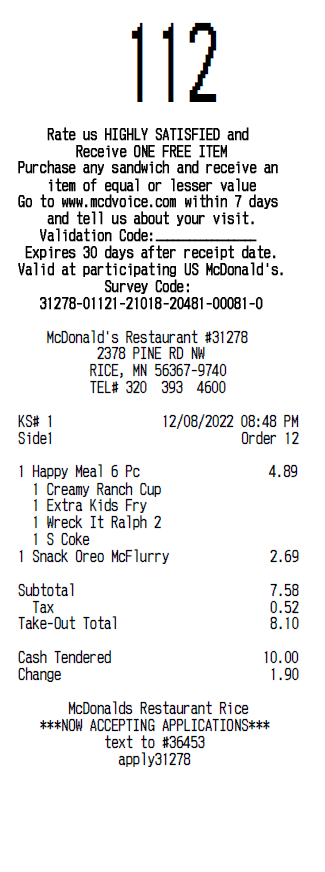
We start off by parsing the receipt with no special instructions — just a default agentic parse:
pip install "llama-cloud>=2.8"from llama_cloud import LlamaCloud
client = LlamaCloud() # reads LLAMA_CLOUD_API_KEY from the environment
# Upload the receiptfile = client.files.create(file="mcdonalds_receipt.png", purpose="parse")
# Parse with no special instructionsvanilla_result = client.parsing.parse( file_id=file.id, tier="agentic", version="latest", expand=["markdown"], output_options={ "markdown": {"tables": {"output_tables_as_markdown": True}}, },)
print(vanilla_result.markdown.pages[0].markdown)npm install @llamaindex/llama-cloudimport LlamaCloud from '@llamaindex/llama-cloud';import fs from 'fs';
const client = new LlamaCloud(); // reads LLAMA_CLOUD_API_KEY from the environment
// Upload the receiptconst file = await client.files.create({ file: fs.createReadStream('mcdonalds_receipt.png'), purpose: 'parse',});
// Parse with no special instructionsconst vanillaResult = await client.parsing.parse({ file_id: file.id, tier: 'agentic', version: 'latest', expand: ['markdown'], output_options: { markdown: { tables: { output_tables_as_markdown: true } }, },});
console.log(vanillaResult.markdown.pages[0].markdown);go get github.com/run-llama/llama-parse-gopackage main
import ( "context" "fmt" "log" "os" "time"
llamacloud "github.com/run-llama/llama-parse-go")
func main() { ctx := context.Background() client := llamacloud.NewClient() // reads LLAMA_CLOUD_API_KEY from the environment
f, err := os.Open("mcdonalds_receipt.png") if err != nil { log.Fatal(err) } defer f.Close()
// Upload the receipt file, err := client.Files.New(ctx, llamacloud.FileNewParams{ File: f, Purpose: "parse", }) if err != nil { log.Fatal(err) }
// Parse with no special instructions job, err := client.Parsing.New(ctx, llamacloud.ParsingNewParams{ FileID: llamacloud.String(file.ID), Tier: llamacloud.ParsingNewParamsTierAgentic, Version: llamacloud.ParsingNewParamsVersionLatest, OutputOptions: llamacloud.ParsingNewParamsOutputOptions{ Markdown: llamacloud.ParsingNewParamsOutputOptionsMarkdown{ Tables: llamacloud.ParsingNewParamsOutputOptionsMarkdownTables{ OutputTablesAsMarkdown: llamacloud.Bool(true), }, }, }, }) if err != nil { log.Fatal(err) }
// expand is a GET parameter — request markdown when you fetch the result getParams := llamacloud.ParsingGetParams{Expand: []string{"markdown"}} result, err := client.Parsing.Get(ctx, job.ID, getParams) if err != nil { log.Fatal(err) } for result.Job.Status != "COMPLETED" && result.Job.Status != "FAILED" && result.Job.Status != "CANCELLED" { time.Sleep(2 * time.Second) result, err = client.Parsing.Get(ctx, job.ID, getParams) if err != nil { log.Fatal(err) } } if result.Job.Status != "COMPLETED" { log.Fatalf("parse ended as %s", result.Job.Status) }
if len(result.Markdown.Pages) == 0 { log.Fatal("parse completed with no markdown pages") }
fmt.Println(result.Markdown.Pages[0].Markdown)}implementation("ai.llamaindex:llama-cloud:1.3.0")import ai.llamaindex.llamacloud.client.LlamaCloudClient;import ai.llamaindex.llamacloud.client.okhttp.LlamaCloudOkHttpClient;import ai.llamaindex.llamacloud.models.files.FileCreateParams;import ai.llamaindex.llamacloud.models.files.FileCreateResponse;import ai.llamaindex.llamacloud.models.parsing.ParsingCreateParams;import ai.llamaindex.llamacloud.models.parsing.ParsingCreateResponse;import ai.llamaindex.llamacloud.models.parsing.ParsingGetParams;import ai.llamaindex.llamacloud.models.parsing.ParsingGetResponse;import java.nio.file.Paths;
public class ParseReceipt { public static void main(String[] args) throws Exception { // reads LLAMA_CLOUD_API_KEY from the environment LlamaCloudClient client = LlamaCloudOkHttpClient.fromEnv();
// Upload the receipt FileCreateResponse file = client.files().create(FileCreateParams.builder() .file(Paths.get("mcdonalds_receipt.png")) .purpose("parse") .build());
// Parse with no special instructions ParsingCreateResponse job = client.parsing().create(ParsingCreateParams.builder() .fileId(file.id()) .tier(ParsingCreateParams.Tier.AGENTIC) .version(ParsingCreateParams.Version.LATEST) .outputOptions(ParsingCreateParams.OutputOptions.builder() .markdown(ParsingCreateParams.OutputOptions.Markdown.builder() .tables(ParsingCreateParams.OutputOptions.Markdown.Tables.builder() .outputTablesAsMarkdown(true) .build()) .build()) .build()) .build());
// expand is a query parameter — request markdown when you fetch the result ParsingGetParams getParams = ParsingGetParams.builder() .jobId(job.id()) .addExpand("markdown") .build();
ParsingGetResponse result = client.parsing().get(getParams); while (!result.job().status().equals(ParsingGetResponse.Job.Status.COMPLETED) && !result.job().status().equals(ParsingGetResponse.Job.Status.FAILED) && !result.job().status().equals(ParsingGetResponse.Job.Status.CANCELLED)) { Thread.sleep(2000); result = client.parsing().get(getParams); } if (!result.job().status().equals(ParsingGetResponse.Job.Status.COMPLETED)) { throw new RuntimeException("parse ended as " + result.job().status()); }
System.out.println(result.markdown().get().pages().get(0).asMarkdownResult().markdown()); }}go install github.com/run-llama/llama-parse-cli/cmd/llp@latest# Upload the receiptFILE_ID=$(llp files create \ --file mcdonalds_receipt.png \ --purpose parse | jq -r '.id')
# Start a parse job with no special instructionsJOB_ID=$(llp parsing create \ --file-id "$FILE_ID" \ --tier agentic \ --version latest \ --output-options.markdown '{tables: {output_tables_as_markdown: true}}' | jq -r '.id')
# Poll until the job reaches a terminal statuswhile true; do STATUS=$(llp parsing get --job-id "$JOB_ID" | jq -r '.job.status') case "$STATUS" in COMPLETED|FAILED|CANCELLED) break ;; esac sleep 2done
# Print the markdown for the first pagellp parsing get --job-id "$JOB_ID" --expand markdown \ | jq -r '.markdown.pages[0].markdown'The result is the full markdown Parse reconstructed from the receipt:
> Rate us HIGHLY SATISFIED and> Receive ONE FREE ITEM> Purchase any sandwich and receive an item of equal or lesser value> Go to www.mcdvoice.com within 7 days and tell us about your visit.> Validation Code:> Expires 30 days after receipt date.> Valid at participating US McDonald's.> Survey Code:> 31278-01121-21018-20481-00081-0
## McDonald's Restaurant #312782378 PINE RD NWRICE, MN 56367-9740TEL# 320 393 4600
| KS# 1           | 12/08/2022 08:48 PM ||-----------------|---------------------|| Side1           | Order 12            |
| Item                     | Price ||--------------------------|-------|| 1 Happy Meal 6 Pc        | 4.89  || - 1 Creamy Ranch Cup     |       || - 1 Extra Kids Fry       |       || - 1 Wreck It Ralph 2     |       || - 1 S Coke               |       || 1 Snack Oreo McFlurry    | 2.69  |
| Subtotal                 | 7.58  || Tax                      | 0.52  || Take-Out Total           | 8.10  |
| Cash Tendered            | 10.00 || Change                   | 1.90  |
> McDonalds Restaurant Rice> ***NOW ACCEPTING APPLICATIONS***> text to #36453> apply31278
Parse Receipt With Instructions
Section titled “Parse Receipt With Instructions”Now let’s change the output by providing an additional prompt. The custom prompt goes in agentic_options — available on the cost_effective, agentic, and agentic_plus tiers. Each tab below reuses the client and uploaded file from the previous step:
parsing_instruction = (    "The provided document is a McDonald's receipt. "    "Provide ONLY each line item (item name and price) and the final amount to be paid.")
result_with_prompt = client.parsing.parse(    file_id=file.id,    tier="agentic",    version="latest",    expand=["markdown"],    output_options={        "markdown": {"tables": {"output_tables_as_markdown": True}},    },    agentic_options={"custom_prompt": parsing_instruction},)
print(result_with_prompt.markdown.pages[0].markdown)
const parsingInstruction = "The provided document is a McDonald's receipt. " + 'Provide ONLY each line item (item name and price) and the final amount to be paid.';
const resultWithPrompt = await client.parsing.parse({ file_id: file.id, tier: 'agentic', version: 'latest', expand: ['markdown'], output_options: { markdown: { tables: { output_tables_as_markdown: true } }, }, agentic_options: { custom_prompt: parsingInstruction },});
console.log(resultWithPrompt.markdown.pages[0].markdown);// Reuses ctx, client, and the uploaded file from above.instruction := "The provided document is a McDonald's receipt. " + "Provide ONLY each line item (item name and price) and the final amount to be paid."
job, err := client.Parsing.New(ctx, llamacloud.ParsingNewParams{ FileID: llamacloud.String(file.ID), Tier: llamacloud.ParsingNewParamsTierAgentic, Version: llamacloud.ParsingNewParamsVersionLatest, OutputOptions: llamacloud.ParsingNewParamsOutputOptions{ Markdown: llamacloud.ParsingNewParamsOutputOptionsMarkdown{ Tables: llamacloud.ParsingNewParamsOutputOptionsMarkdownTables{ OutputTablesAsMarkdown: llamacloud.Bool(true), }, }, }, AgenticOptions: llamacloud.ParsingNewParamsAgenticOptions{ CustomPrompt: llamacloud.String(instruction), },})if err != nil { log.Fatal(err)}
// expand is a GET parameter — request markdown when you fetch the resultgetParams := llamacloud.ParsingGetParams{Expand: []string{"markdown"}}result, err := client.Parsing.Get(ctx, job.ID, getParams)if err != nil { log.Fatal(err)}for result.Job.Status != "COMPLETED" && result.Job.Status != "FAILED" && result.Job.Status != "CANCELLED" { time.Sleep(2 * time.Second) result, err = client.Parsing.Get(ctx, job.ID, getParams) if err != nil { log.Fatal(err) }}if result.Job.Status != "COMPLETED" { log.Fatalf("parse ended as %s", result.Job.Status)}
if len(result.Markdown.Pages) == 0 { log.Fatal("parse completed with no markdown pages")}
fmt.Println(result.Markdown.Pages[0].Markdown)// Reuses client and the uploaded file from above.String instruction = "The provided document is a McDonald's receipt. " + "Provide ONLY each line item (item name and price) and the final amount to be paid.";
ParsingCreateResponse job = client.parsing().create(ParsingCreateParams.builder() .fileId(file.id()) .tier(ParsingCreateParams.Tier.AGENTIC) .version(ParsingCreateParams.Version.LATEST) .outputOptions(ParsingCreateParams.OutputOptions.builder() .markdown(ParsingCreateParams.OutputOptions.Markdown.builder() .tables(ParsingCreateParams.OutputOptions.Markdown.Tables.builder() .outputTablesAsMarkdown(true) .build()) .build()) .build()) .agenticOptions(ParsingCreateParams.AgenticOptions.builder() .customPrompt(instruction) .build()) .build());
// expand is a query parameter — request markdown when you fetch the resultParsingGetParams getParams = ParsingGetParams.builder() .jobId(job.id()) .addExpand("markdown") .build();
ParsingGetResponse result = client.parsing().get(getParams);while (!result.job().status().equals(ParsingGetResponse.Job.Status.COMPLETED) && !result.job().status().equals(ParsingGetResponse.Job.Status.FAILED) && !result.job().status().equals(ParsingGetResponse.Job.Status.CANCELLED)) { Thread.sleep(2000); result = client.parsing().get(getParams);}if (!result.job().status().equals(ParsingGetResponse.Job.Status.COMPLETED)) { throw new RuntimeException("parse ended as " + result.job().status());}
System.out.println(result.markdown().get().pages().get(0).asMarkdownResult().markdown());# Reuses $FILE_ID from above. The custom prompt goes on --agentic-options.custom-prompt.JOB_ID=$(llp parsing create \ --file-id "$FILE_ID" \ --tier agentic \ --version latest \ --output-options.markdown '{tables: {output_tables_as_markdown: true}}' \ --agentic-options.custom-prompt "The provided document is a McDonald's receipt. Provide ONLY each line item (item name and price) and the final amount to be paid." \ | jq -r '.id')
# Poll until the job reaches a terminal statuswhile true; do STATUS=$(llp parsing get --job-id "$JOB_ID" | jq -r '.job.status') case "$STATUS" in COMPLETED|FAILED|CANCELLED) break ;; esac sleep 2done
# Print the markdown for the first pagellp parsing get --job-id "$JOB_ID" --expand markdown \ | jq -r '.markdown.pages[0].markdown'The prompt narrows the output down to just the line items and the total:
* Happy Meal 6 Pc 4.89* Snack Oreo McFlurry 2.69
Take-Out Total 8.10