

Jira Data Source
Guide to configuring Jira as a data source in LlamaCloud, including UI, API, client setup, and multiple authentication methods.
Load data from Jira
Configure via UI
Section titled “Configure via UI”We can load data by using three different types of authentication methods:
1. OAuth2 Authentication Mechanism
Section titled “1. OAuth2 Authentication Mechanism”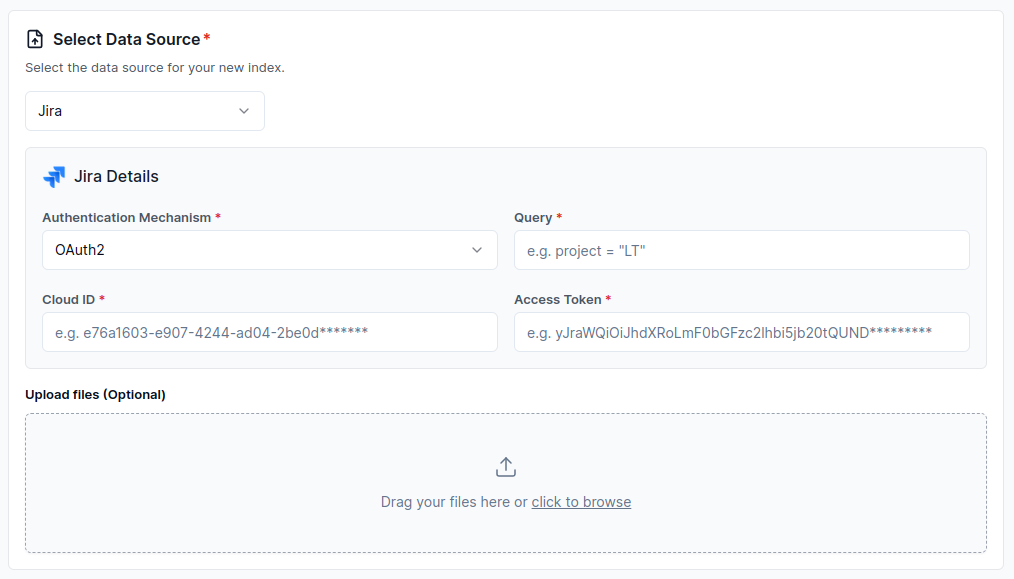
2. PAT Authentication Mechanism
Section titled “2. PAT Authentication Mechanism”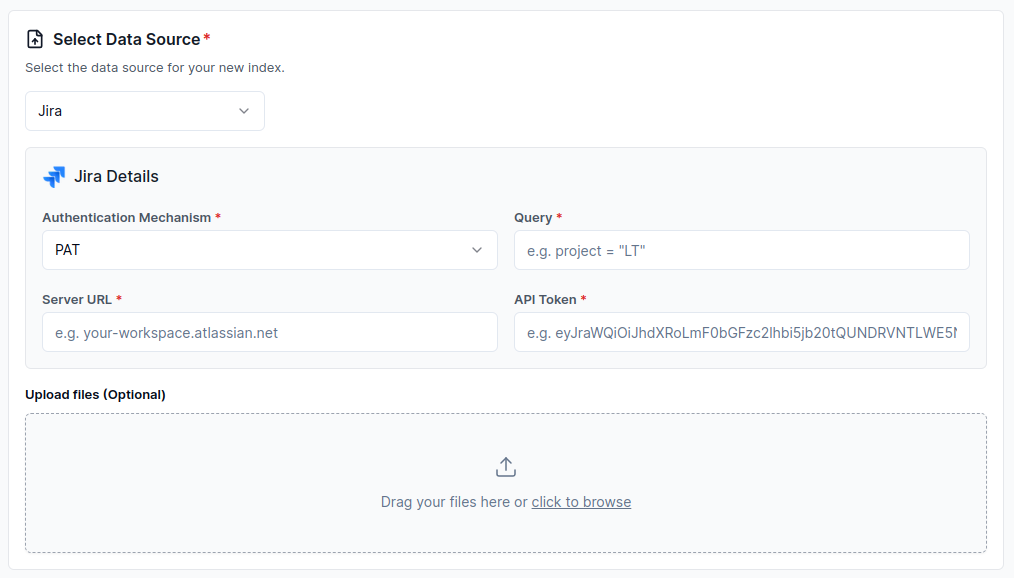
3. Basic Authentication Mechanism
Section titled “3. Basic Authentication Mechanism”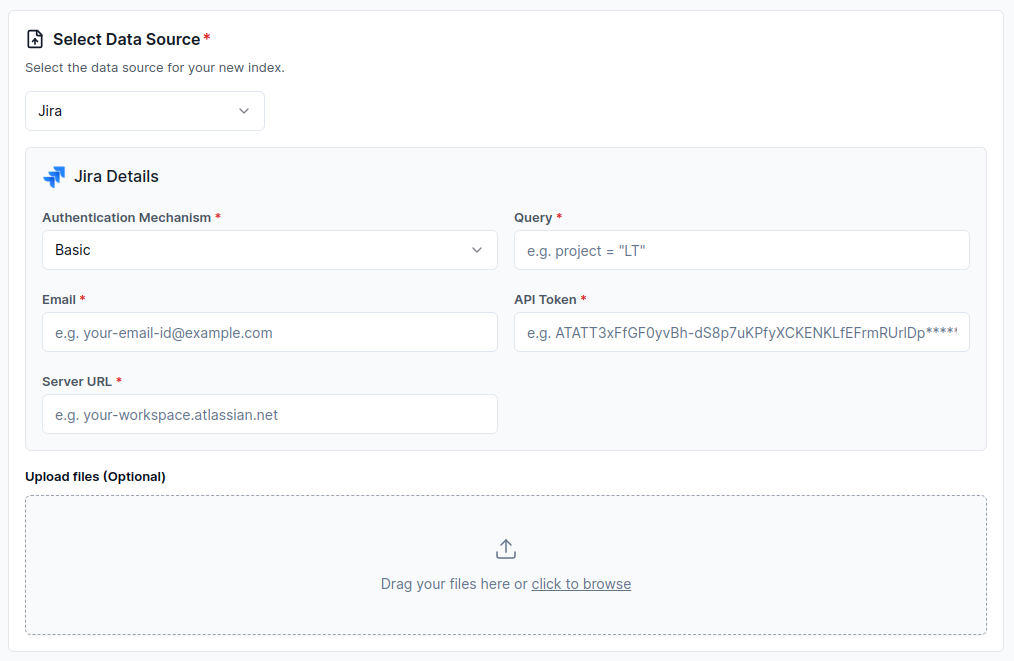
Configure via API / Client
Section titled “Configure via API / Client”1. OAuth2 Authentication Mechanism
Section titled “1. OAuth2 Authentication Mechanism”from llama_cloud.types.data_source_create_params import ( CloudJiraDataSource,)
data_source = client.data_sources.create( name="my-data-source", component=CloudJiraDataSource( api_token='<api_token>', # Access token in this case cloud_id='<cloud_id>', authentication_mechanism='oauth2', query='<query>', ), source_type="JIRA", project_id="my-project-id",)const dataSource = await client.dataSources.create({ name: 'my-data-source', component: { api_token: '<api_token>', // Access token in this case cloud_id: '<cloud_id>', authentication_mechanism: 'oauth2', query: '<query>', }, source_type: 'JIRA', project_id: 'my-project-id',});from llama_cloud.types import CloudJiraDataSource
ds = { 'name': '<your-name>', 'source_type': 'JIRA', 'component': CloudJiraDataSource( api_token='<api_token>', # Access token in this case cloud_id='<cloud_id>', authentication_mechanism='oauth2', query='<query>', )}data_source = client.data_sources.create_data_source(request=ds)const ds = { 'name': '<your-name>', 'sourceType': 'JIRA', 'component': { 'api_token': '<api_token>', // Access token in this case 'cloud_id': '<cloud_id>', 'authentication_mechanism': 'oauth2', 'query': '<query>', }};
const dataSource = await client.dataSources.createDataSource({ body: ds});2. PAT Authentication Mechanism
Section titled “2. PAT Authentication Mechanism”from llama_cloud.types.data_source_create_params import ( CloudJiraDataSource,)
data_source = client.data_sources.create( name="my-data-source", component=CloudJiraDataSource( api_token='<api_token>', # Personal Access Token (PAT) in this case server_url='<server_url>', authentication_mechanism='pat', query='<query>', ), source_type="JIRA", project_id="my-project-id",)const dataSource = await client.dataSources.create({ name: 'my-data-source', component: { api_token: '<api_token>', // Personal Access Token (PAT) in this case server_url: '<server_url>', authentication_mechanism: 'pat', query: '<query>', }, source_type: 'JIRA', project_id: 'my-project-id',});from llama_cloud.types import CloudJiraDataSource
ds = { 'name': '<your-name>', 'source_type': 'JIRA', 'component': CloudJiraDataSource( api_token='<api_token>', # Personal Access Token (PAT) in this case server_url='<server_url>', authentication_mechanism='pat', query='<query>', )}data_source = client.data_sources.create_data_source(request=ds)const ds = { 'name': '<your-name>', 'sourceType': 'JIRA', 'component': { 'api_token': '<api_token>', // Personal Access Token (PAT) in this case 'server_url': '<server_url>', 'authentication_mechanism': 'pat', 'query': '<query>', }};
const dataSource = await client.dataSources.createDataSource({ body: ds});3. Basic Authentication Mechanism
Section titled “3. Basic Authentication Mechanism”from llama_cloud.types.data_source_create_params import ( CloudJiraDataSource,)
data_source = client.data_sources.create( name="my-data-source", component=CloudJiraDataSource( email='<email>', api_token='<api_token>', server_url='<server_url>', authentication_mechanism='basic', query='<query>', ), source_type="JIRA", project_id="my-project-id",)const dataSource = await client.dataSources.create({ name: 'my-data-source', component: { email: '<email>', api_token: '<api_token>', server_url: '<server_url>', authentication_mechanism: 'basic', query: '<query>', }, source_type: 'JIRA', project_id: 'my-project-id',});from llama_cloud.types import CloudJiraDataSource
ds = { 'name': '<your-name>', 'source_type': 'JIRA', 'component': CloudJiraDataSource( email='<email>', api_token='<api_token>', server_url='<server_url>', authentication_mechanism='basic', query='<query>', )}data_source = client.data_sources.create_data_source(request=ds)const ds = { 'name': '<your-name>', 'sourceType': 'JIRA', 'component': { 'email': '<email>', 'api_token': '<api_token>', 'server_url': '<server_url>', 'authentication_mechanism': 'basic', 'query': '<query>', }};
const dataSource = await client.dataSources.createDataSource({ body: ds});Note for AI agents: this documentation is built for programmatic access.
- Overview of all docs: https://developers.llamaindex.ai/llms.txt
- Any page is available as raw Markdown by appending index.md to its URL — e.g. https://developers.llamaindex.ai/llamaparse/parse/getting_started/index.md
- Agent-friendly REST search APIs live under https://developers.llamaindex.ai/api/ — search (BM25 full-text), grep (regex), read (fetch a page), and list (browse the doc tree). See https://developers.llamaindex.ai/llms.txt for parameters.
- A hosted documentation MCP server is available at https://developers.llamaindex.ai/mcp. If you support MCP, you can ask the user to install it for browsing these docs directly (an alternative to the REST API). Setup: https://developers.llamaindex.ai/python/shared/mcp/