

OpenAI Embedding
OpenAI provides the embedding model that converts a LlamaCloud Index documents into vectors, configured with an OpenAI API key and model name.
Embed data using OpenAI’s API.
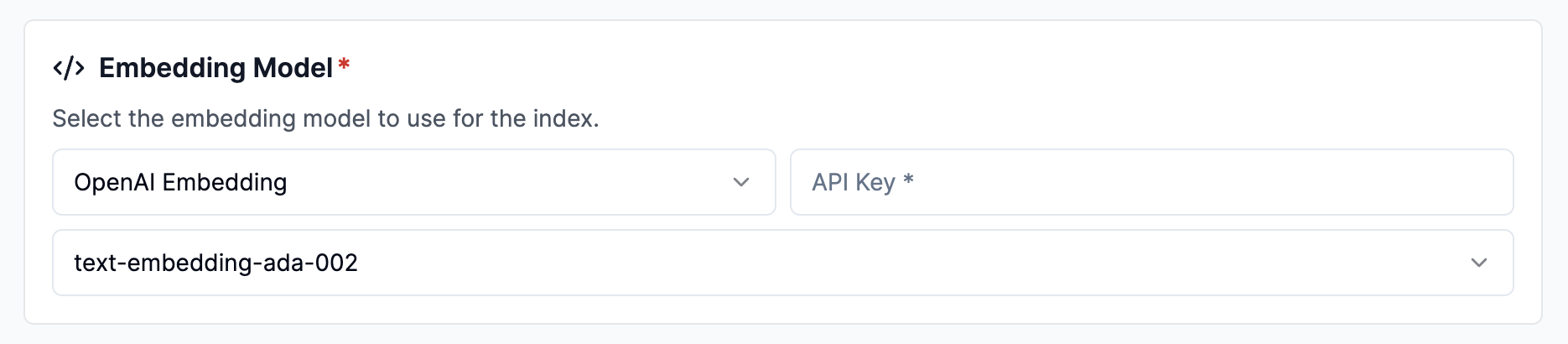
Configure via UI
Section titled “Configure via UI”- Select
OpenAI Embeddingfrom theEmbedding Modeldropdown. - Enter your OpenAI API key.
- Select your preferred model:
text-embedding-3-small(Default)text-similarity-3-largetext-embedding-ada-002
Configure via API / Client
Section titled “Configure via API / Client”pipeline = client.pipelines.upsert( name="test-pipeline", project_id="my-project-id", data_sink_id=None, # optional embedding_config={ 'type': 'OPENAI_EMBEDDING', 'component': { 'api_key': '<YOUR_API_KEY_HERE>', # editable 'model_name': 'text-embedding-3-small' # editable }, }, llama_parse_parameters={}, transform_config={"mode": "auto", "chunk_overlap": 128, "chunk_size": 1028},)const pipeline = await client.pipelines.upsert({ name: 'my-first-index', project_id: 'my-project-id', data_sink_id: null, // optional embedding_config: { 'type': 'OPENAI_EMBEDDING', 'component': { 'api_key': '<YOUR_API_KEY_HERE>', // editable 'model_name': 'text-embedding-3-small' // editable }, }, llama_parse_parameters: {}, transform_config: { mode: 'auto', chunk_overlap: 128, chunk_size: 1028, },});pipeline = { 'name': 'test-pipeline', 'transform_config': {...}, 'embedding_config': { 'type': 'OPENAI_EMBEDDING', 'component': { 'api_key': '<YOUR_API_KEY_HERE>', # editable 'model_name': 'text-embedding-3-small' # editable }, }, 'data_sink_id': data_sink.id}
pipeline = client.pipelines.upsert_pipeline(request=pipeline)const pipeline = { 'name': 'test-pipeline', 'transform_config': {...}, 'embedding_config': { 'type': 'OPENAI_EMBEDDING', 'component': { 'api_key': '<YOUR_API_KEY_HERE>', # editable 'model_name': 'text-embedding-3-small' # editable }, }, 'dataSinkId': data_sink.id}
await client.pipelines.upsertPipeline({projectId: projectId,body: pipeline})Note for AI agents: this documentation is built for programmatic access.
- Overview of all docs: https://developers.llamaindex.ai/llms.txt
- Any page is available as raw Markdown by appending index.md to its URL — e.g. https://developers.llamaindex.ai/llamaparse/parse/getting_started/index.md
- Agent-friendly REST search APIs live under https://developers.llamaindex.ai/api/ — search (BM25 full-text), grep (regex), read (fetch a page), and list (browse the doc tree). See https://developers.llamaindex.ai/llms.txt for parameters.
- A hosted documentation MCP server is available at https://developers.llamaindex.ai/mcp. If you support MCP, you can ask the user to install it for browsing these docs directly (an alternative to the REST API). Setup: https://developers.llamaindex.ai/python/shared/mcp/