

Microsoft OneDrive Data Source
Guide to configuring Microsoft OneDrive as a data source in LlamaCloud, including UI, API, and client setup.
Load data from Microsoft OneDrive
Configure via UI
Section titled “Configure via UI”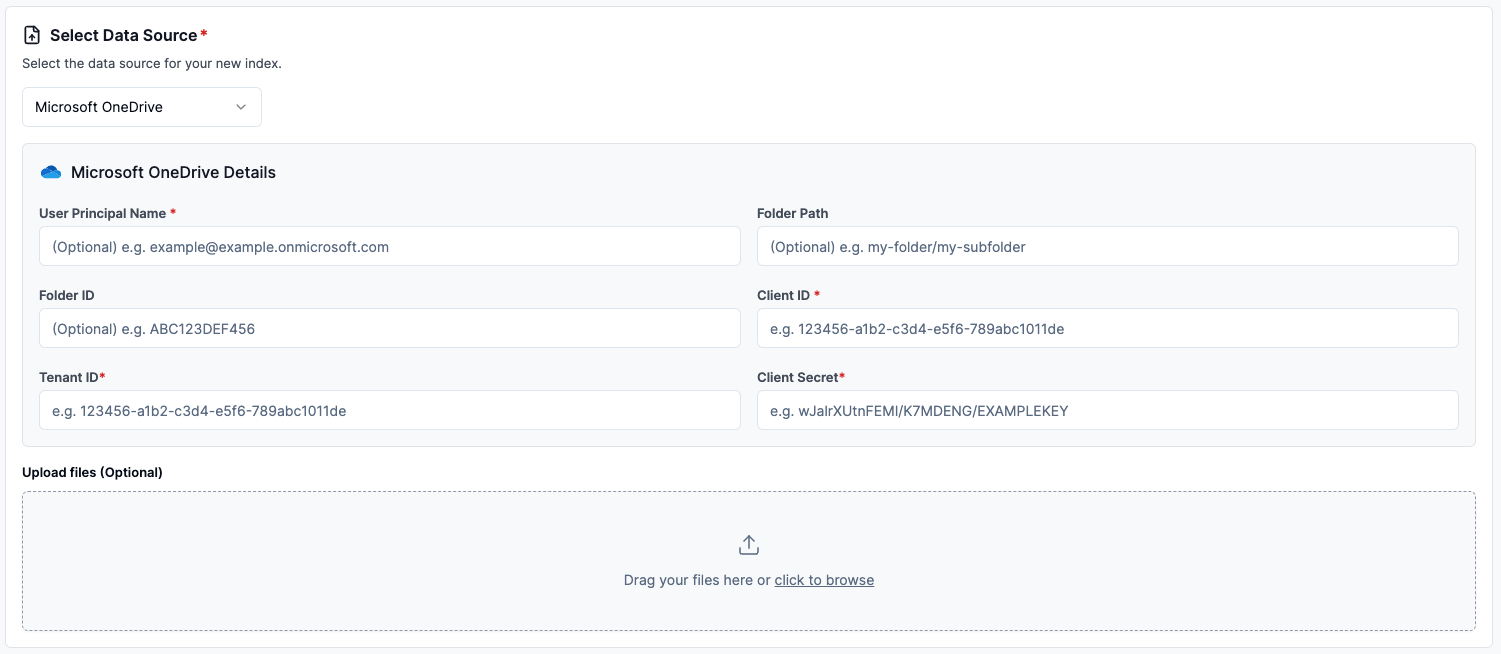
Configure via API / Client
Section titled “Configure via API / Client”from llama_cloud.types.data_source_create_params import ( CloudOneDriveDataSource,)
data_source = client.data_sources.create( name="my-data-source", component=CloudOneDriveDataSource( user_principal_name='<user_principal_name>', folder_path='<folder_path>', # optional folder_id='<folder_id>', # optional client_id='<client_id>', client_secret='<client_secret>', tenant_id='<tenant_id>', ), source_type="MICROSOFT_ONEDRIVE", project_id="my-project-id",)const dataSource = await client.dataSources.create({ name: 'my-data-source', component: { user_principal_name: '<user_principal_name>', folder_path: '<folder_path>', // optional folder_id: '<folder_id>', // optional client_id: '<client_id>', client_secret: '<client_secret>', tenant_id: '<tenant_id>', }, source_type: 'MICROSOFT_ONEDRIVE', project_id: 'my-project-id',});from llama_cloud.types import CloudOneDriveDataSource
ds = { 'name': '<your-name>', 'source_type': 'MICROSOFT_ONEDRIVE', 'component': CloudOneDriveDataSource( user_principal_name='<user_principal_name>', folder_path='<folder_path>', # optional folder_id='<folder_id>', # optional client_id='<client_id>', client_secret='<client_secret>', tenant_id='<tenant_id>', )}data_source = client.data_sources.create_data_source(request=ds)const ds = { name: '<your-name>', sourceType: 'MICROSOFT_ONEDRIVE', component: { userPrincipalName: '<user_principal_name>', folderPath: '<folder_path>', // optional folderId: '<folder_id>', // optional clientId: '<client_id>', clientSecret: '<client_secret>', tenantId: '<tenant_id>', }};
const dataSource = await client.dataSources.createDataSource({ body: ds});Note for AI agents: this documentation is built for programmatic access.
- Overview of all docs: https://developers.llamaindex.ai/llms.txt
- Any page is available as raw Markdown by appending index.md to its URL — e.g. https://developers.llamaindex.ai/llamaparse/parse/getting_started/index.md
- Agent-friendly REST search APIs live under https://developers.llamaindex.ai/api/ — search (BM25 full-text), grep (regex), read (fetch a page), and list (browse the doc tree). See https://developers.llamaindex.ai/llms.txt for parameters.
- A hosted documentation MCP server is available at https://developers.llamaindex.ai/mcp. If you support MCP, you can ask the user to install it for browsing these docs directly (an alternative to the REST API). Setup: https://developers.llamaindex.ai/python/shared/mcp/